Send your program over Syphon
Syphon shares TCast's program video with other apps on the same Mac. This has next to no latency. It's a good way to get your program into OBS, VDMX, Resolume, or MadMapper when they're running on this same machine.
Syphon sends video only. For audio, pair it with the audio monitor or a muted OBS Browser Source. See Add the audio.
Syphon is a Pro feature. On the free tier the switch is disabled and shows a Pro lock. See Licensing.
What you'll need
- The receiving app running on the same Mac as TCast. Syphon is same-machine only. To reach another computer, use NDI instead.
- A Syphon-capable receiver. For OBS this means the Syphon Client source, which needs OBS 31.x or 32.0.2 and later.
Turn on Syphon
Two places, one switch:
From the sidebar (fastest)
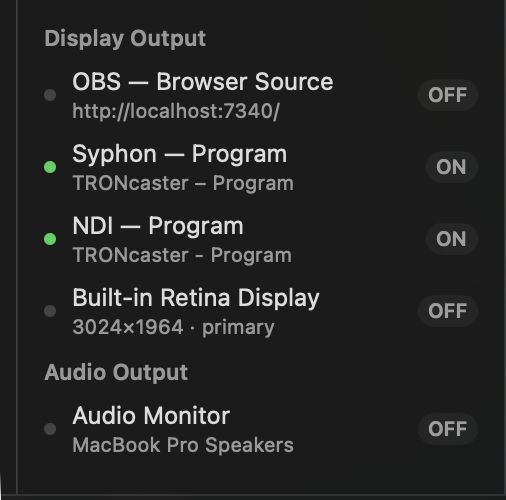
- Under Display Output, click the Syphon — Program row. The label flips to ON.
From Settings
- Open Settings (the TCast ▸ Settings… menu, or press ⌘,).
- Select the Output pane.
- Under Syphon Output, switch on Publish program video over Syphon.
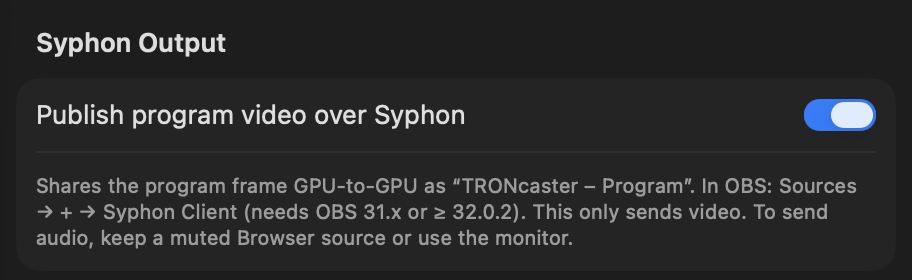
TCast now publishes a Syphon server named:
TCast – Program
Receive the feed in OBS
- In Sources, click + ▸ Syphon Client.
- Don't see it? Update OBS. The Syphon Client source needs OBS 31.x or 32.0.2+.
- In the source's properties, pick TCast – Program from the Source list.
The program appears immediately, at the full stage resolution.
Add the audio
Syphon carries picture only. To get program audio alongside it, either:
- Turn on the audio monitor and route it to a virtual device like BlackHole that OBS takes in with macOS Audio Capture. The monitor lives in Settings ▸ Output ▸ Audio Monitor, and there's a faster route in the sidebar under Audio Output.
- Or add a muted OBS Browser Source with Control audio via OBS enabled on it. The browser source then supplies the audio while Syphon supplies the video.
Of the two, I personally recommend the Audio Capture. While it does require one more install, I trust it even more.
What gets sent
- The program video, exactly what's on air, at your Stage resolution and frame rate (Settings ▸ Output ▸ Stage). Change the stage and the Syphon feed follows. 4K and custom sizes and rates are Pro.
- No audio. See Add the audio.
Like NDI and the audio monitor, Syphon is a preview-side output. It publishes the program regardless of which physical displays you have open.
Syphon or something else?
If OBS is on this Mac and picture quality and latency matter most, Syphon is the one to use. The documentation index has the full comparison against NDI and Browser Source.
Troubleshooting
The switch is disabled
- Syphon is a Pro feature. See Licensing.
No "Syphon Client" source in OBS
- Update OBS. The source ships in OBS 31.x and 32.0.2+.
The source list is empty in OBS
- Confirm the Syphon — Program row shows ON in TCast's sidebar, or that Publish program video over Syphon is on in Settings.
- Syphon is same-machine only, so OBS must be on this Mac. For another computer use NDI.
Picture is black
- Check something is actually on air in TCast. Syphon sends whatever the program is showing, so if that's black, so is the feed.
There's no sound
- That makes sense. Syphon is video only. See Add the audio.